Looking into Docker Image Digests
For my first blog post we’re going to take a look at image digests, with a focus on how they’re listed on DockerHub, and how we can use them to identify different tags that point to the same image.
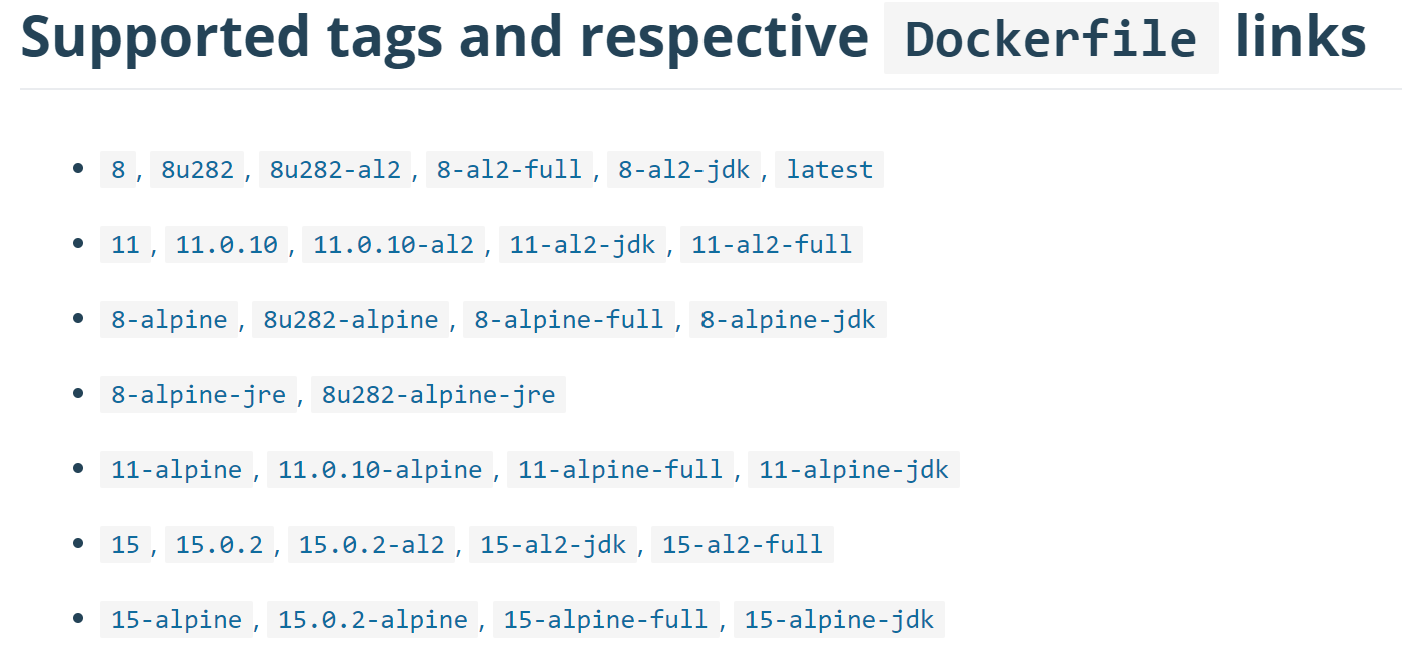
I’m currently writing a small application that will replicate this
list. It will let you embed the list by including a
<script> block in your Markdown file, similar to embedding Gists.
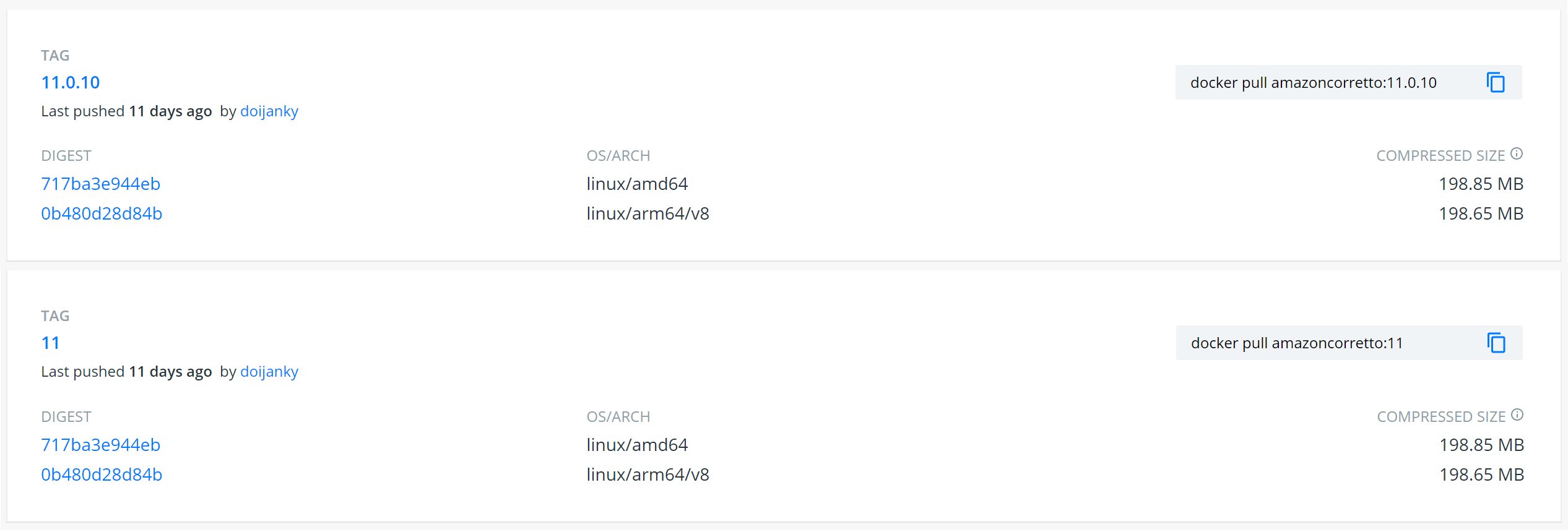
Here we can see two tags that refer to the same image. The image also
targets two platforms, linux/amd64 and linux/arm64/v8.
Using the Docker Registry V2 API, how do we get this information? We will want to use these endpoints:
Getting Started with a Registry Client
We’re using Heroku’s docker-registry-client. It hasn’t been updated in a couple of years, but it exposes those two endpoints and doesn’t have the complexity of some other libraries.
Lets start by creating a Client and retrieving the list of tags.
registryClient, err = client.New(url, username, password)
if err != nil {
  log.Fatal("Could not create the registry client", err)
}

tags, err := registryClient.Tags("library/amazoncorretto")
Now we have a list of all the tags for the repository.
We can also get the digest of the manifest using a reference.
In this case a tag.
Using client.ManifestDigest("library/amazoncorretto", "11") we get:
sha256:38455efd51e100ce0cdcc481036749395363671ed71406b21ad78b69b22b2c37
This doesn’t match with the what we’ve seen on DockerHub. Lets use cURL to replicate the request and see what we get back. Stack Overflow has a great walkthrough on how to make the requests.
curl -vH "Authorization: Bearer $TOKEN" https://registry-1.docker.io/v2/library/amazoncorretto/manifests/11
> Host: registry-1.docker.io
> User-Agent: curl/7.47.0
> Accept: */*
> Authorization: Bearer <redacted>
>
< HTTP/1.1 200 OK
< Content-Length: 5560
< Content-Type: application/vnd.docker.distribution.manifest.v1+prettyjws
< Docker-Content-Digest: sha256:38455efd51e100ce0cdcc481036749395363671ed71406b21ad78b69b22b2c37
< Docker-Distribution-Api-Version: registry/2.0
< Etag: "sha256:38455efd51e100ce0cdcc481036749395363671ed71406b21ad78b69b22b2c37"
...
Great, we can see that the same, incorrect digest is returned in the Docker-Content-Digest header.
The Content-Type header is interesting. We’re getting a v1 manifest back.
Docker has documented the different Media Types that are available.
Manifest V2
Lets start by specifying Accept: application/vnd.docker.distribution.manifest.v2+json.
curl -vH "Authorization: Bearer $TOKEN" -H "Accept: application/vnd.docker.distribution.manifest.v2+json" https://registry-1.docker.io/v2/library/amazoncorretto/manifests/11
> Host: registry-1.docker.io
> User-Agent: curl/7.47.0
> Accept: application/vnd.docker.distribution.manifest.v2+json
> Authorization: Bearer <redacted>
>
< HTTP/1.1 200 OK
< Content-Type: application/vnd.docker.distribution.manifest.v2+json
< Docker-Content-Digest: sha256:717ba3e944ebbbbc0f1e0a37a1099cd2c6154549398ac96f9a1bc5c47ee18d7a
< Docker-Distribution-Api-Version: registry/2.0
< Etag: "sha256:717ba3e944ebbbbc0f1e0a37a1099cd2c6154549398ac96f9a1bc5c47ee18d7a"
Perfect. Manifest V2 returns the digest we see on DockerHub!
We can also pipe the raw (ugly) JSON directly into sha256sum and get the same digest.
Manifest List V2
Earlier we saw that a tag could refer to multiple images targetting a single platform.
This was exactly what application/vnd.docker.distribution.manifest.list.v2+json was
made for. This gives us a
Manifest List.
The list references each platform-specific image by the digest.
{
  "manifests": [
    {
      "digest": "sha256:717ba3e944ebbbbc0f1e0a37a1099cd2c6154549398ac96f9a1bc5c47ee18d7a",
      "mediaType": "application/vnd.docker.distribution.manifest.v2+json",
      "platform": {
        "architecture": "amd64",
        "os": "linux"
      },
      "size": 742
    },
    {
      "digest": "sha256:0b480d28d84b4492c9f6eace74094a8295035572f4202f15b10ce1c144d67a13",
      "mediaType": "application/vnd.docker.distribution.manifest.v2+json",
      "platform": {
        "architecture": "arm64",
        "os": "linux",
        "variant": "v8"
      },
      "size": 742
    }
  ],
  "mediaType": "application/vnd.docker.distribution.manifest.list.v2+json",
  "schemaVersion": 2
}
This can be used when you need a different, or multiple, platforms.
Note that this means Manifest V2 defaults to linux/amd64. Perhaps
because this is the first in the Manifest List.
Fixing Heroku’s Docker Registry Client
The Heroku library supported getting V2 manifests. However, the
client.ManifestDigest(repo, ref) function, which uses a HEAD method
request, doesn’t specify the Accept header.
I’ve forked the repository and
added a ManifestDigestV2 function.
But docker image IDs are different?
Running docker images we get the name of the image, the tag and an IMAGE ID.
REPOSITORY            TAG   IMAGE ID       CREATED         SIZE
amazoncorretto        11    e5a017eba449   10 days ago     445MB
Previously we’ve been looking at the digest for the manifest; the document that contains information on how to get the image.
{
  "schemaVersion": 2,
  "mediaType": "application/vnd.docker.distribution.manifest.v2+json",
  "config": {
    "mediaType": "application/vnd.docker.container.image.v1+json",
    "size": 2990,
    "digest": "sha256:e5a017eba449ce2eb19d142ad9d92b997006af8f761162d189ed384b4e6f4a63"
  },
  "layers": [
    {
      "mediaType": "application/vnd.docker.image.rootfs.diff.tar.gzip",
      "size": 61996576,
      "digest": "sha256:62350c28fdb7b7cbd0e199dd893555ed129ed85da482d882b1eeb574988ea7d6"
    },
    {
      "mediaType": "application/vnd.docker.image.rootfs.diff.tar.gzip",
      "size": 146517618,
      "digest": "sha256:383b03c8da6a748602d2579040e3d1b907c0c4c0b6d59b586e8e41c342acace6"
    }
  ]
}
Here we can see the IMAGE ID is the digest for the image config.